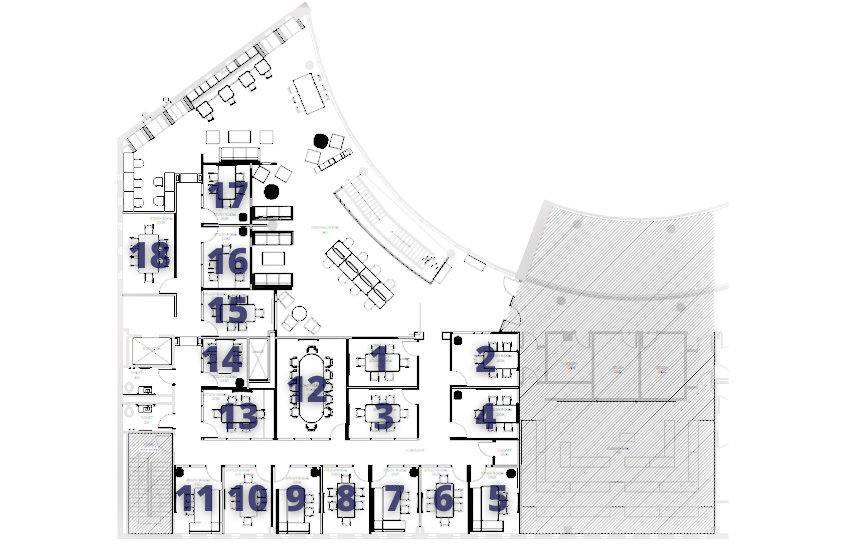
Library Team Room Guidelines
- Rooms may be used and reserved by Owen Community members only.
- Rooms are intended for teams and groups to work together.
When no other options are available, individuals may conduct virtual interviews.
Otherwise, individuals should utilize the library reading rooms. - Reservations may be made up to 72 hours in advance.
- Room reservations not used within 15 minutes of the start time are forfeited.
- Markers and erasers are available at the library service desk.
- Receive help for technology trouble shooting at av.support@vanderbilt.edu (mailto:av.support@vanderbilt.edu) or 615-875-9188, do not dismantle the equipment.
- Covered drinks and light snacks are allowable. Don’t leave trash in the rooms, use bins outside the library.
Monitors and Equipment
To use the monitors and audiovisual equipment, follow these instructions: Mercury Tabletop Conference System.
For support with the monitors and equipment, email (av.suppport@vanderbilt.edu) or call 615-875-9188.
How to Reserve a Room
1. Go to the Management Library Home Page and click on the ‘Team Rooms’ link under Quick Links or Follow this link
2. Choose “Click here to Reserve a Room’
3. Log in in the upper right where it says ‘Welcome, Guest’

4. Select ‘Book Now’ From the Owen Study Room Request Form Template

5. Choose your Date and Start- and End-Times for your meeting

6. Enter your number of people and the list will automatically shrink to show only the rooms with an appropriate capacity. Find a room that is open during your window and click on the green plus sign

7. Click ‘Add Room’

8. The selected Room should now appear on your list of selected rooms at the top of the page

9. Click ‘Next Step’ in the upper-right corner of the page

10. Fill out the form with your Group Name and Contact Information and click ‘Create Reservation’ at either the top or the bottom of the page

Your room is now reserved!