

eStar March Update: guides and eLearnings now available
eStar March Update: Guides and eLearnings Now Available

On March 29, Epic’s Storyboard feature is coming to eStar. This will represent a major user experience change for all users. Additional changes are coming along with Storyboard.
All resources are available on the eStar Upgrades website.
How to Prepare: Leaders and Managers
1. Download/View Materials
- Download and review the Leadership Toolkit
- Download and review the Leadership Toolkit PowerPoint (download at bottom of browser window)
- View the Webinar for Leaders (in Learning Exchange, search "2020 Q1 Release Leadership Toolkit Webinar" to self-enroll)
- View the Upgrade video of changes for Inpatient/Procedural and/or Outpatient (in Learning Exchange, search "eStar Upgrade Overview-March 2020" to self-enroll)
2. Prepare Your Teams
- Identify the Guides to the Galaxy applicable to your area and share with your team members
- Ask staff to take the Storyboard eLearning applicable to their role:
- eStar 2020 Q1 Release: Storyboard for all Users
- eStar 2020 Q1 Release: Storyboard for Oncology and Therapy Plan Users
- eStar 2020 Q1 Release: Storyboard for Obstetrics Nursing Users
- eStar 2020 Q1 Release: Storyboard for Cadence Users
- eStar 2020 Q1 Release: Storyboard for Billing Users
- eStar 2020 Q1 Release: Storyboard for Patient Access Users
- eStar 2020 Q1 Release: Storyboard for Perioperative and Anesthesia Users
- eStar 2020 Q1 Release: Storyboard for Pharmacy Users
- Share the Storyboard infographic
- Allow staff to attend a Storyboard Drop-in Session
- Designate area for staff to review changes in Playground
- Review slides or discuss talking points in staff or department meetings
- (Optional) share the Upgrade video of changes for Inpatient/Procedural and/or Outpatient (in Learning Exchange, search "eStar Upgrade Overview-March 2020" to self-enroll)
How to Prepare: End Users
- Review your Guide to the Galaxy
- Each guide contains an overview of the changes based on role (all guides are available from Hubbl):
- eStar 2020 Q1 Release PROVIDER Guide to the Galaxy
- eStar 2020 Q1 Release NURSE AND CLINICAL SUPPORT Guide to the Galaxy
- eStar 2020 Q1 Release NONCLINICAL Guide to the Galaxy
- eStar 2020 Q1 Release PHARMACY Guide to the Galaxy
- eStar 2020 Q1 Release ANCILLARY Guide to the Galaxy
- Electronic booklets are divided into role-specific bundles
- Each book begins with a chapter on general changes
- Primary eStar applications are divided alphabetically into chapter
- Secondary applications are at the end of the book and divided by area of focus, such as In Basket or Care Everywhere.
- Get familiar with Storyboard
- View the Storyboard eLearning applicable to your role:
- eStar 2020 Q1 Release: Storyboard for all Users
- eStar 2020 Q1 Release: Storyboard for Oncology and Therapy Plan Users
- eStar 2020 Q1 Release: Storyboard for Obstetrics Nursing Users
- eStar 2020 Q1 Release: Storyboard for Cadence Users
- eStar 2020 Q1 Release: Storyboard for Billing Users
- eStar 2020 Q1 Release: Storyboard for Patient Access Users
- eStar 2020 Q1 Release: Storyboard for Perioperative and Anesthesia Users
- eStar 2020 Q1 Release: Storyboard for Pharmacy Users
- Download the Storyboard infographic
- Take approximately 30 minutes to attend a Storyboard Drop-in Session
- Practice in the Playground
Spend some time in the eStar playground – find your training log-in on Hubbl.
Update to Dictation Software (Dragon)
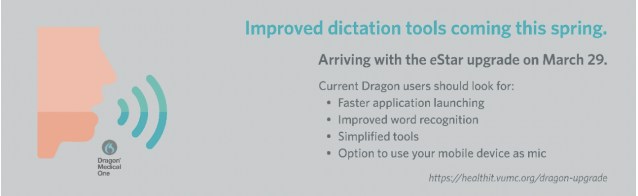
On March 29, 2020, VUMC is updating its clinical dictation solution, switching from an outdated Dragon Medical Network Edition to Dragon Medical One (DMO). This upgrade will bring several benefits, including:
- No required voice training
- No required mic calibration
- Automatic accent detection
- Improved word recognition
- Option to transform your mobile device into a mic, with PowerMic Mobile (Mobile Device Management solution required)
Because DMO is cloud-based (vs. server-based), users will also see:
- Easier updates
- Faster launch and close times
- More intuitive tools
Current Dragon users will need to log in and have activity on their account before March 13 to be identified as an active user. Users who do not do so will have to set up a new account in DMO after March 29.
Getting to Know Dragon Medical One
Dictating via DM One is functionally very similar to the outgoing solution.
Users will notice the following:
- Smaller Dragonbar
- Single location for menu items (under blue flame icon)
- No more yellow (asleep) mic status
- Updated commands
New to Dragon?
New Dragon users will need to call the Help Desk to request that an account be set up in DMO. After March 29, new users can leverage the self-help tools available via the website below to become familiar with the functionality of DMO. Providers at VUMC can also request a 1:1 training from HealthIT experts. Please note that scheduling for personal trainings can vary based on demand.
Training for DMO will be accessible via https://healthit.vumc.org/dragon-upgrade.
Updated Alerts & Notifications for VUMC Clinicians
Beginning February 26, VUMC clinicians will now be able to use Alerts & Notifications in two new, exciting ways.
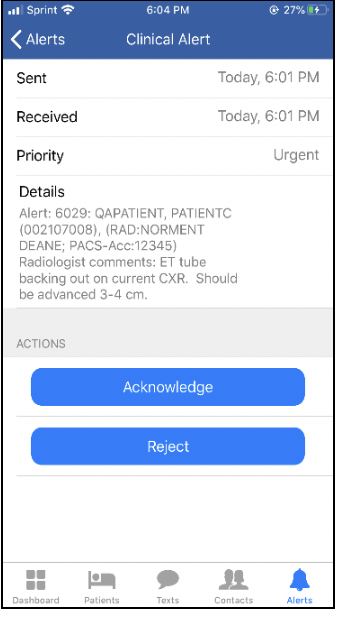
- Clinicians will be able to acknowledge or reject critical alerts within MH-CURE by Mobile Heartbeat (in addition to using eStar or the Alerts Mobile web application).
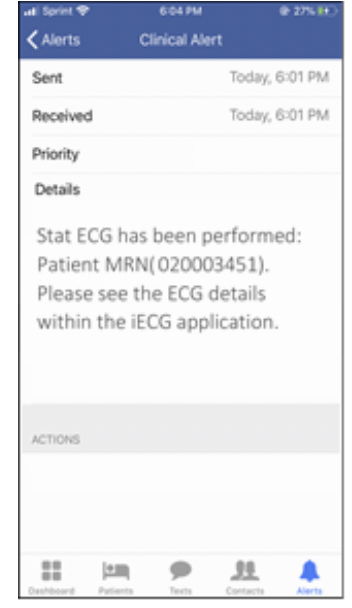
- For adult inpatients, the patient care team will receive an FYI pager notification when a stat ECG order is performed for the patient.
Additionally, new functionality is currently in pilot phase and will be coming soon. Clinicians will be able to opt in to receive eStar In Basket messages on their mobile device, based on user preferences in Synergy.
Need Assistance with MH-CURE? Kiosks Available This Spring on Main Campus
MH-CURE by Mobile Heartbeat is available for VUMC users who wish to receive clinical pages on their mobile devices (forwarding of pages to mobile devices without MH-CURE is being disabled).
Support kiosks have been scheduled to assist with the MH-CURE download and installation process. The kiosks will be held:
- VUH- North Lobby of Light Hall from noon-1:30p:
- Monday, February 24
- Monday, March 30
- Monday, April 27th
- Tuesday, May 26
- VCH- Stage area of Butterfly Garden from noon-1:30p:
- Monday, March 16
- Monday, April 13
- Monday, May 11
If you choose to visit one of the kiosks, please complete the following steps one to two (1-2) days prior to visiting the kiosk:
Step 1.
- Complete the REDCap survey to request access to the MH-CURE application
https://is.gd/BYODAccessRequestForm
Step 2.
- Go to Learning Exchange – https://learningexchange.vumc.org/#/
- Search for “BYOD” or “Mobile Heartbeat”
- Complete the module based on the type of device you have (i.e., iOS/Apple, Android)
eStar Updates & Changes
- Given that clinicians can copy forward text in eStar, the "MARKASREVIEWED" Smart Link has been removed from production. This is to prevent copying information from previous visits that may no longer be accurate
- Lab test "UR Kappa and Lambda Free Light Chains Qnt-ARUP" now known as "UR IFE w/Free Light Chains Qnt-ARUP